

| Device Type | Modbus TCP (Ethernet) | Curtailment |
|---|---|---|
| SAJ AS2 | ✅ | ✅ |
| SAJ H1 | ||
| SAJ H2 series-5k-30k | ||
| SAJ HS2 series-5k-10k | ||
| SAJ AS3 | ||
| SAJ HS3 | ||
| SAJ CHS2 | ||
| SAJ CM2 |
For a site connected through a SAJ eManager-C1 Pro, use the separate eManager connection below instead of selecting an individual inverter model.
The eManager is a local gateway for the inverters connected to it. This connection reads the combined installation through the eManager rather than opening a separate connection to every inverter.
Testing The eManager connection is currently in testing and requires controller software that includes it. This is a separate connection from the direct SAJ inverter integrations listed above.
| Setting | Value |
|---|---|
| Manufacturer and device selection | SAJ → eManager |
| Connection | Ethernet / Modbus TCP |
| TCP port | 502 |
| Modbus address | The eManager's configured address; default 1 |
| Inverter count | The number of inverters connected to the eManager, from 1 to 255 |
502 and configured Modbus address. This connection uses Ethernet, not the RS485 settings for other SAJ equipment.The eManager combines readings from its connected inverters. The controller uses the inverter count to convert the combined voltage and frequency readings back to meaningful values. For example, four connected inverters can return a combined frequency reading of 200 Hz; an inverter count of 4 produces the expected 50 Hz display.
If voltage or frequency appears to be a multiple of the expected value, correct Inverter count. Do not compensate by changing the electrical installation settings. The power readings represent the combined system and are not divided by this count.
The connection provides an AC active-power setpoint for the combined system. It does not provide independent setpoints for every inverter behind the eManager, or a separate PV power-limit command.
For optimal performance, ensure the following communication parameters:
| Step | Image |
|---|---|
| Open ESAJ Home and connect to the inverter | |
| Select SAJ in battery settings and click Save after the change | 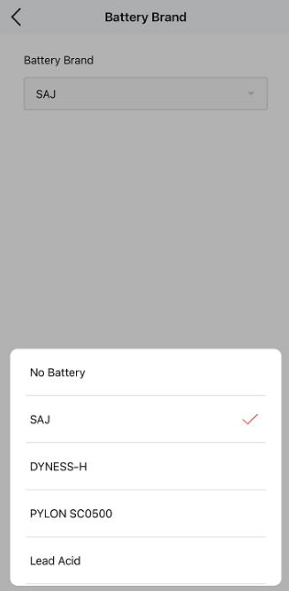 |
| Click initialization and select grid for the country | 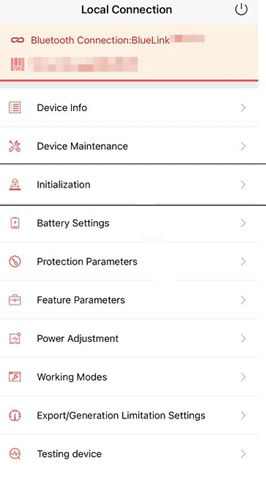 |
| Disable Export limitation (if it is enabled power from the inverter cannot be fed into the grid). | 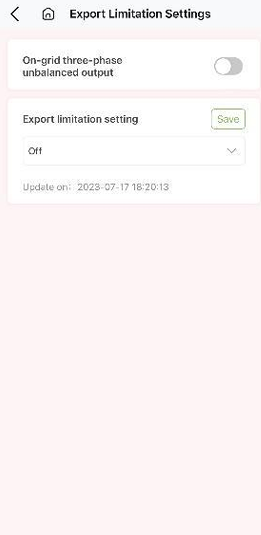 |
Common issues and solutions:
No Communication
Intermittent Connection